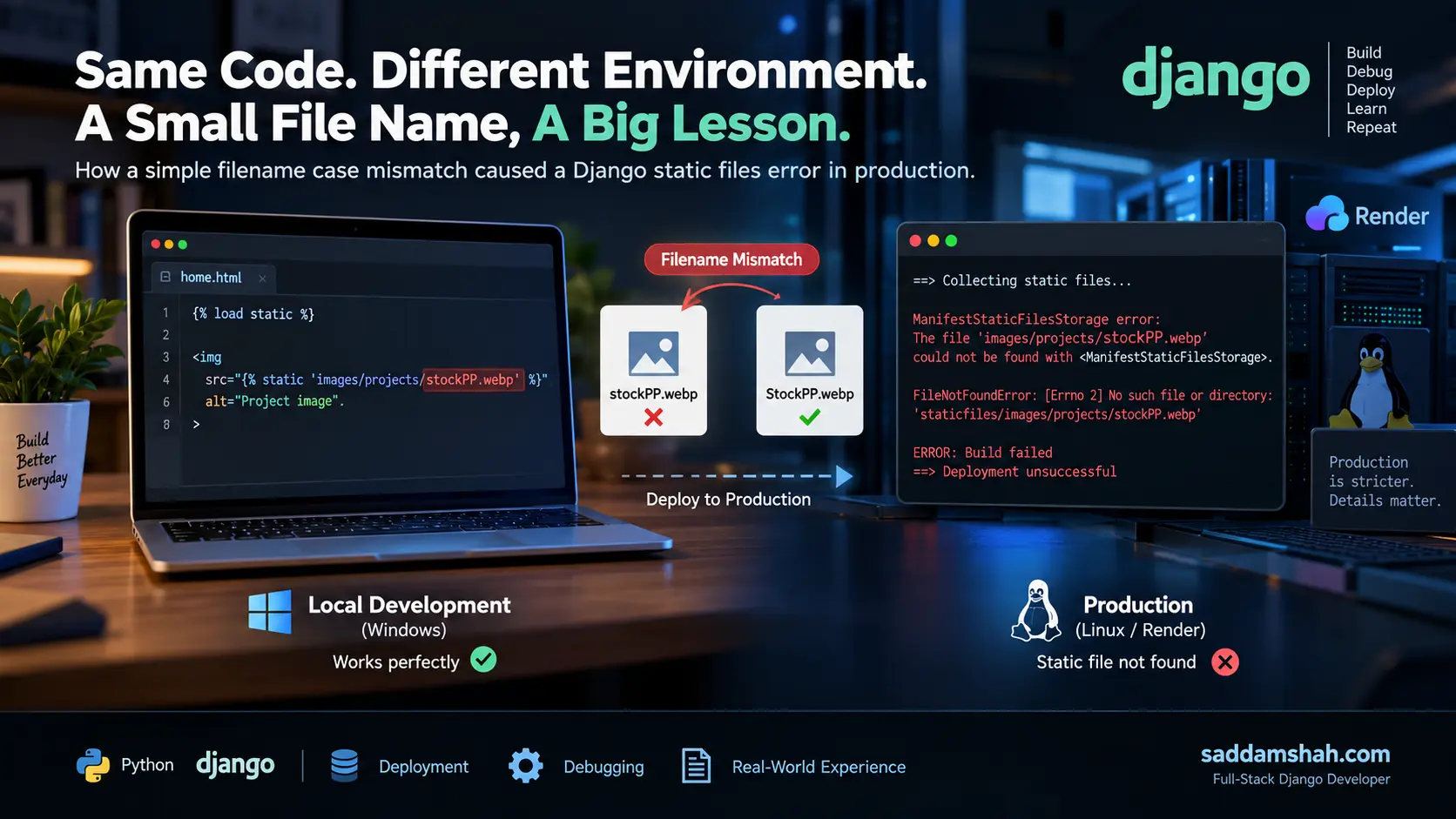
Building a Django application locally and deploying it to production can feel like two very different stages of development.
I experienced this firsthand while deploying my developer portfolio. The application was working during development, but after moving it toward a production configuration, I encountered an error related to Django's static files.
The cause turned out to be surprisingly small:
A filename used in my code did not match the actual filename's capitalization.
It was a simple mistake, but it exposed an important difference between development and production environments and gave me a much better understanding of how Django handles static assets.
My portfolio uses Django templates with static assets for CSS, images, project screenshots, profile images, and other frontend resources.
A typical image reference in my templates looks like this:
{% load static %}

<img
    src="{% static 'images/profile2.png' %}"
    alt="Profile image"
>
During development, these static references were working as expected.
But when I prepared and deployed the project for production, Django reported a missing static-file manifest error.
One of the problematic references involved a project image with a filename similar to:
stockPP.webp
while the actual file used different capitalization:
StockPP.webp
At first glance, that difference doesn't look significant.
In production, it was.
Why It Happened
The issue came down to filename case sensitivity.
My local development environment was Windows. A filename capitalization difference can easily go unnoticed there because filesystem behavior may allow a reference with different capitalization to still resolve.
The production environment did not give me the same margin for error.
For example, these two paths should not be treated as interchangeable:
images/projects/stockPP.webp
images/projects/StockPP.webp
Once Django's production static-file processing became involved, the incorrect reference could no longer be silently ignored.
That meant a tiny inconsistency that had survived local development became a real production problem.
Investigating the Error
The important part of the debugging process was not immediately changing random deployment settings.
I needed to determine what Django was actually complaining about.
The error pointed toward a static asset that Django expected to find but couldn't resolve correctly.
That narrowed the investigation to three areas:
- The static file actually stored in the project.
- The path referenced from the Django template.
- The static files collected for production.
After comparing the template reference with the real filename, I found the capitalization mismatch.
The deployment problem wasn't caused by my application logic.
It wasn't a broken Django view.
It wasn't a database issue.
It was the path to a static asset.
Fixing the Filename Mismatch
The fix itself was straightforward: I made sure the filename and the reference used by Django matched exactly.
Instead of allowing a situation like this:
Actual file:
StockPP.webp

Template reference:
stockPP.webp
I standardized the filename and its references so there was one consistent path.
For example:
{% load static %}

<img
    src="{% static 'images/projects/StockPP.webp' %}"
    alt="Project preview"
>
The important point wasn't whether I chose uppercase or lowercase.
The important point was that the filesystem and my Django templates agreed exactly.
Rebuilding Django's Static Files
Correcting the source filename was only part of the fix.
Production static files also need to reflect that correction.
My Django project defines a static root for collected assets:
STATIC_URL = "static/"
STATIC_ROOT = BASE_DIR / "staticfiles"
Django's collectstatic process gathers the application's static assets into the production static directory.
After correcting the filename mismatch, I ran the static collection process again:
python manage.py collectstatic
This rebuilt the collected static assets using the corrected references.
After the corrected files were collected and the updated project was deployed, the missing static-file problem was resolved.
Why collectstatic Matters
Before working through production deployment issues, it is easy to think of CSS files, images, and JavaScript as simply "files inside the project."
Django production deployments require a more deliberate approach.
During development, Django makes working with static assets convenient. Production is stricter because those assets need to be collected and served appropriately.
That is why a command such as:
python manage.py collectstatic
is an important part of a Django deployment workflow.
It also means that incorrect static paths may become visible only when the application goes through production-style static processing.
That was exactly the kind of issue my local environment had allowed me to overlook.
Once I corrected the filename capitalization and rebuilt the static files, the affected static asset could be resolved correctly.
More importantly, the debugging process changed the way I approach deployment problems.
My first instinct now is not:
"It works locally, so something must be wrong with the hosting platform."
Instead, I compare the environments.
I check paths.
I read the actual error.
I verify environment-specific configuration.
And I try to isolate the smallest difference between what works locally and what fails in production.
That approach is much more useful than changing settings until the application happens to start working.
What I Learned
This issue reinforced several lessons that now influence how I build Django projects.
Treat filenames as case-sensitive even during local development.
If production will enforce exact capitalization, I should follow the same discipline while developing locally.
Production deployment is part of development.
An application isn't really finished just because python manage.py runserver works on my computer.
Deployment exposes assumptions that local development may hide.
Read the error before changing the configuration.
A deployment failure can look complicated because Django, the hosting environment, and static-file processing are all involved. But the underlying problem may still be something as small as one character in a filename.
Use consistent naming conventions.
For static assets, I now have another reason to prefer predictable lowercase filenames such as:
portfolio-dashboard.webp
django-blog.webp
profile-image.webp
Consistent naming reduces the opportunity for case-related mistakes.
Local Success Is Not Production Success
Building my portfolio has given me more than another project to put on a resume.
Deploying it has forced me to deal with the less visible side of web development: configuration, static assets, environment differences, production errors, and debugging.
A filename capitalization error sounds minor.
But diagnosing why that minor error could break production taught me something much more valuable:
Production environments expose assumptions that local development can hide.
And learning to find those assumptions is an important part of becoming a better Django developer.
I built this portfolio with Python and Django and continue documenting the real technical problems I encounter while developing and improving it.
You can explore the live project at saddamshah.com.